
Multiple paper sizes
A3 to A8, plus Letter, Legal, Ledger, and 11×17 — whatever you're printing on is already supported.
All sizes →PDF → print-ready booklet
Turn any PDF into a print-ready booklet with our free online booklet converter. Automatically arranged for double-sided printing, folding, and stapling, all in your browser.
Free · private · no account required
Your PDF
Print ready sheet
Folded booklet
Simple. Fast. Private.
Upload once — we handle page order for folding and stapling.
Select or drop your file. We read it in your browser — your file is never uploaded to a server.
Stays in your browser
Select your paper size, orientation, and binding. We use A4 by default, with an easy switch to Letter for US users.
Paper Size
Orientation
Print on
Binding
We rearrange pages into the right order for booklet printing, so you don’t need to work out the numbering yourself.
Download your booklet, print it, then fold and staple. The pages are already in the right order.
Want the full printer walkthrough? See our how to print a booklet from PDF guide.
Ready to create your booklet? Upload your PDF and we'll do the rest.
Free · No signup · Private by design
The basics
A booklet is a small folded book made from regular sheets of paper, like an exam paper, a wedding program, or a school handout you can staple and read like a mini book.
A booklet is not printed like a normal document, where pages appear in the order 1, 2, 3, 4. Instead, the pages are placed in a special order on the sheet so they appear correctly after printing and folding.
The easiest way to understand this is to look at a simple example:
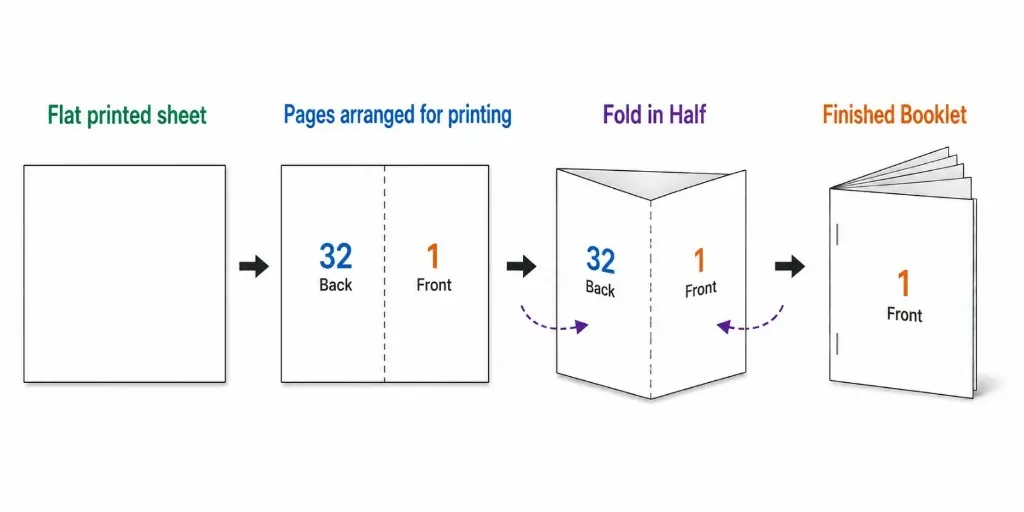
In this 32-page example, page 32 and page 1 are placed next to each other on the outside of the sheet. When the sheet is folded in half, page 1 becomes the front of the booklet and page 32 becomes the back.
The other pages are arranged in the same way, working inward. This allows the finished booklet to be read normally from page 1, then 2, then 3, and so on.
Powerful. Flexible. Made for printing.
A3 to A8, plus Letter, Legal, Ledger, and 11×17 — whatever you're printing on is already supported.
All sizes →Pages are automatically rearranged into the correct order for saddle-stitch booklet printing.
View layouts →Watch your booklet update as you change settings — no guessing what any option does.
See preview →Clear duplex and short-edge binding guidance, so your booklet folds correctly every time.
Print guide →A4 is selected for you, with a one-click switch to Letter if you're in the US.
Choose paper →Your file stays on your device the whole time — it's never uploaded or stored anywhere.
Learn more →Print, fold, and staple with confidence. Follow these simple steps for perfect results.
Full Printing Guide →Print duplex. Prefer short-edge flip for portrait booklets; always test one sheet first.
Fold
Fold each printed sheet in half along the center line.
Staple
Stack the folded sheets together and staple along the fold.
Enjoy
Your booklet is ready to use!
Made for real work
Anyone who has a PDF and wants to print it as a small, folded booklet can use our free booklet maker.
Print study notes, exam papers, class handouts, thesis chapters, or study guides as a booklet instead of a stack of loose pages.
Make simple product catalogs, menus, price lists, or service brochures that are easy to print and hand out.
Create wedding programs, event schedules, conference programs, or other papers for guests to take with them.
Turn comics, poems, zines, portfolios, or other work into a small booklet you can print and share.
Print training guides, employee handbooks, instructions, or reports in a compact booklet format.
Make recipe books, children's activity books, coloring books, and other fun projects at home.
Whatever you are making, the process is simple: upload your PDF, choose your paper size, and download the booklet.
There is no trial, signup, or watermark on your finished PDF.
Choose A4, Letter, Legal, Ledger, 11×17, and other common paper sizes.
The booklet maker works in your browser. You don't need to download an app or install any software.
Your file is processed on your device and is not uploaded or stored online.
Check how your booklet will look before you download it.
Download your finished booklet PDF and print it, or save it to share digitally.
FAQ
Quick answers about privacy, printing, paper sizes, and how Free Booklet Online works.
Ready to Make your booklet
Just upload your PDF, choose the paper size, check the preview, and download the finished booklet. Then print it, fold the pages, and you're ready to go.
No signup · Free · Private by design